Vercel使用有不少需要仔细配置的地方,可惜的是,自定义Vercel缓存时间,Vercel重定向等使用方法略复杂,不是开箱即用,有一定使用门槛,故这里单独列一篇文章详细说明Vercel的一些高级使用方法!
为什么使用 vercel
- 国内
Github Pages速度较慢。 vercel速度快且能够自定义域名,能实现和Github Pages一样的效果
vercel 官方地址:vercel.com/
开始使用
- 首先注册一个账号 https://vercel.com/
- 注册成功后进入页面,点击
News Project
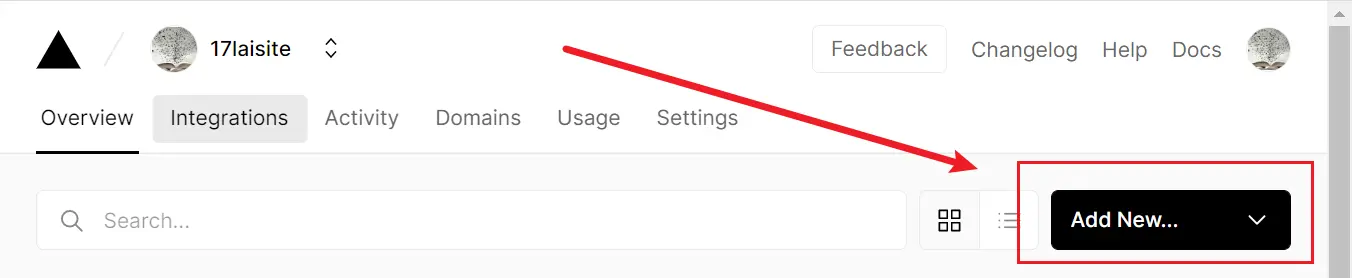
- 然后通过绑定的
github或者gitlab导入需要部署的项目
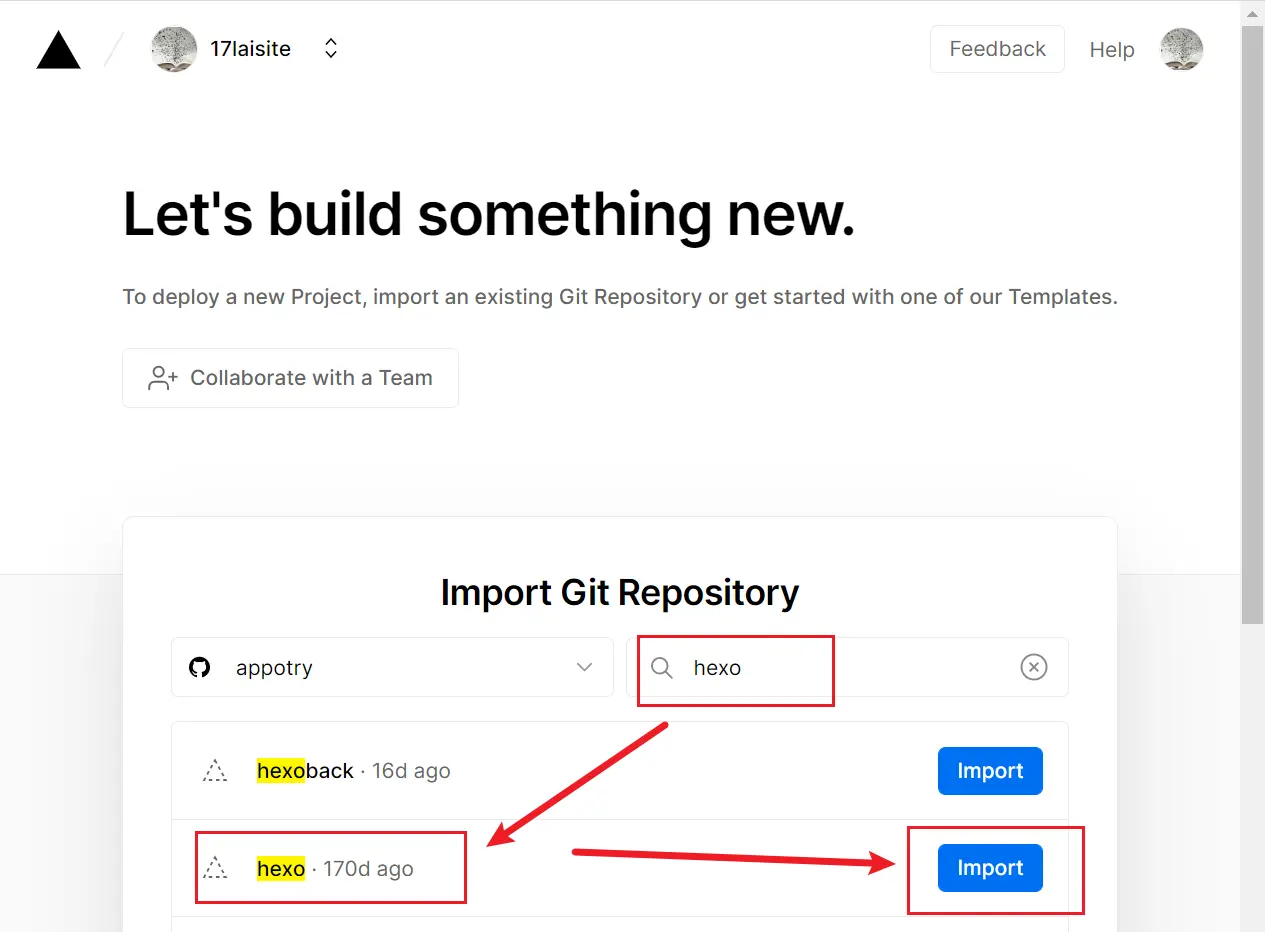
- 如果导入的项目是打包好的静态页,
FRAMEWORK PRESET选择Other。
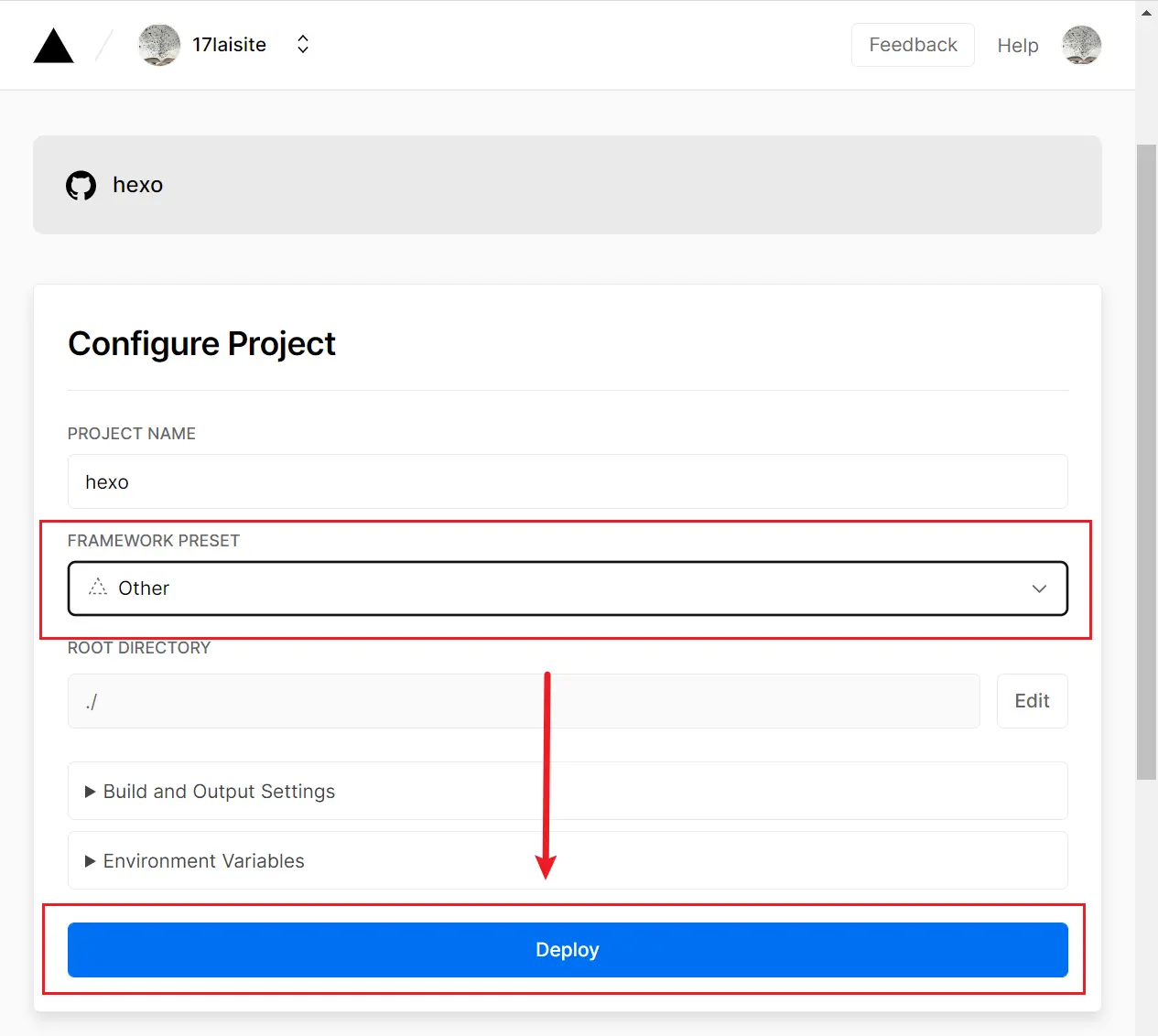
- 点击
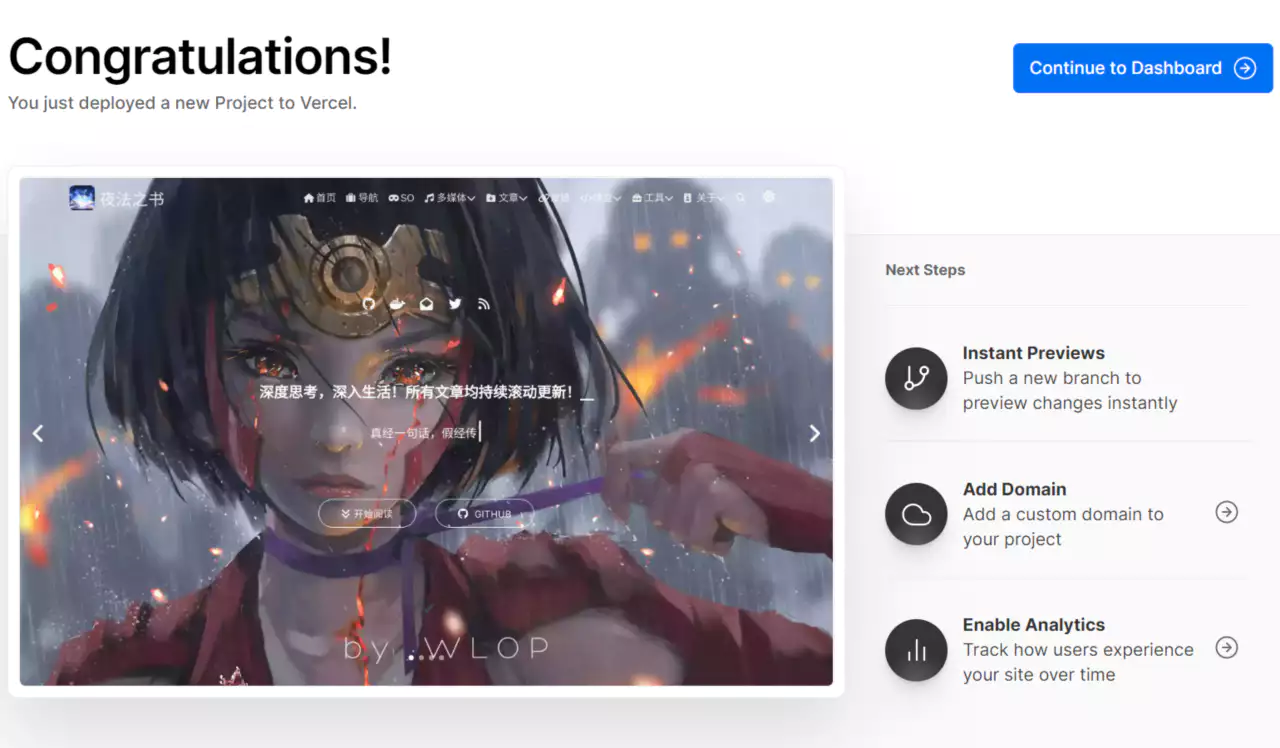
deployed进行部署,如果部署失败可以查看报错信息是不是上一步的某些选项没有覆盖。部署成功后会进入如图所示的界面
如何自定义域名
- 腾讯云域名地址:console.cloud.tencent.com/domain
vercel静态页挂载地址:- 进入到 setting 中可对项目进行一些设置,如项目名称
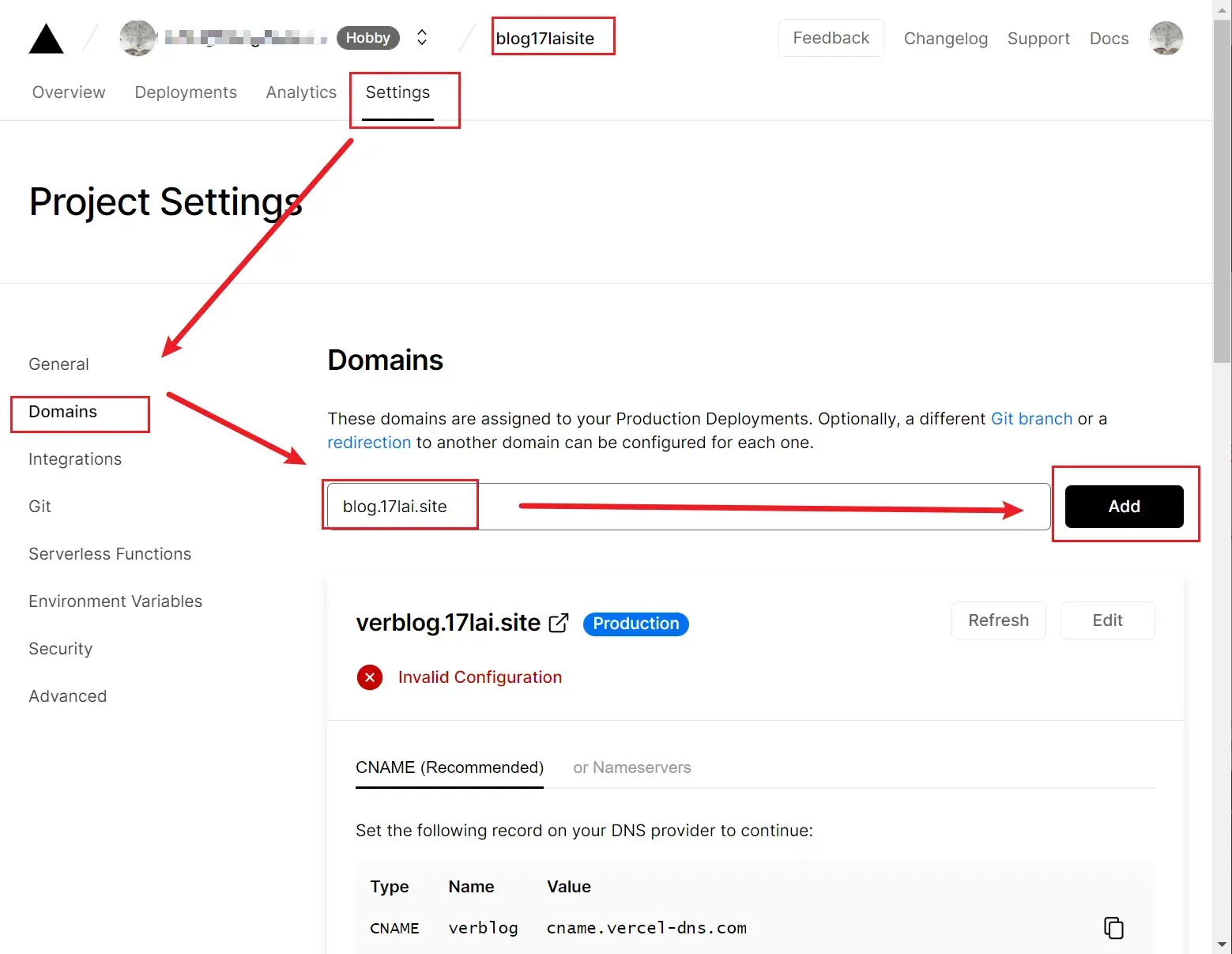
- 下面演示如何自定义域名,默认情况下部署成功后
vercel会给你生成一个默认的域名,如果想要修改成自己的域名可将域名名称修改成自己的。 - 当选择修改成自己的域名名称后,
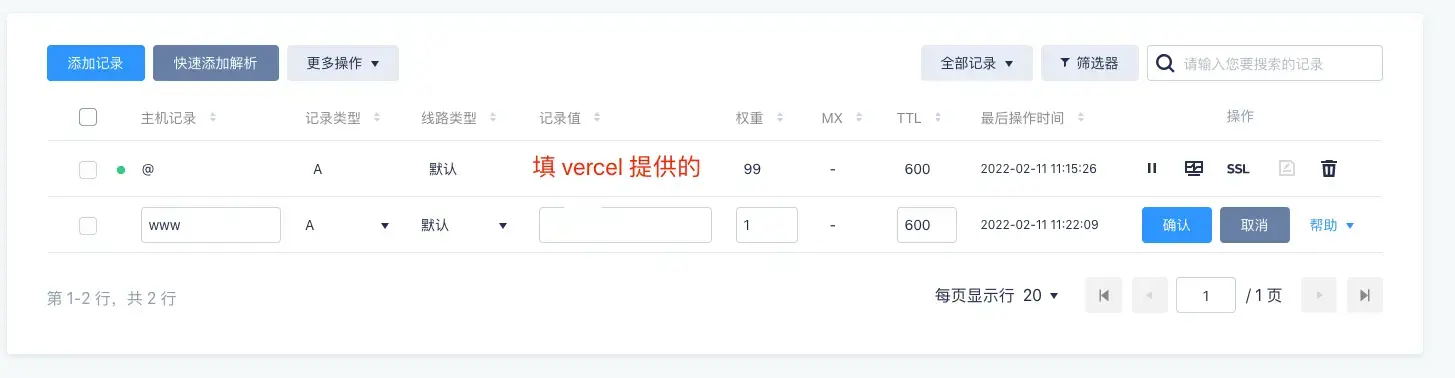
vercel会检查域名指向的DNS对不对,如果不对的话会提示你域名的 DNS 应该如何配置,按照vercel提示的DNS信息
在自己的域名的 DNS 配置中进行配置,如图
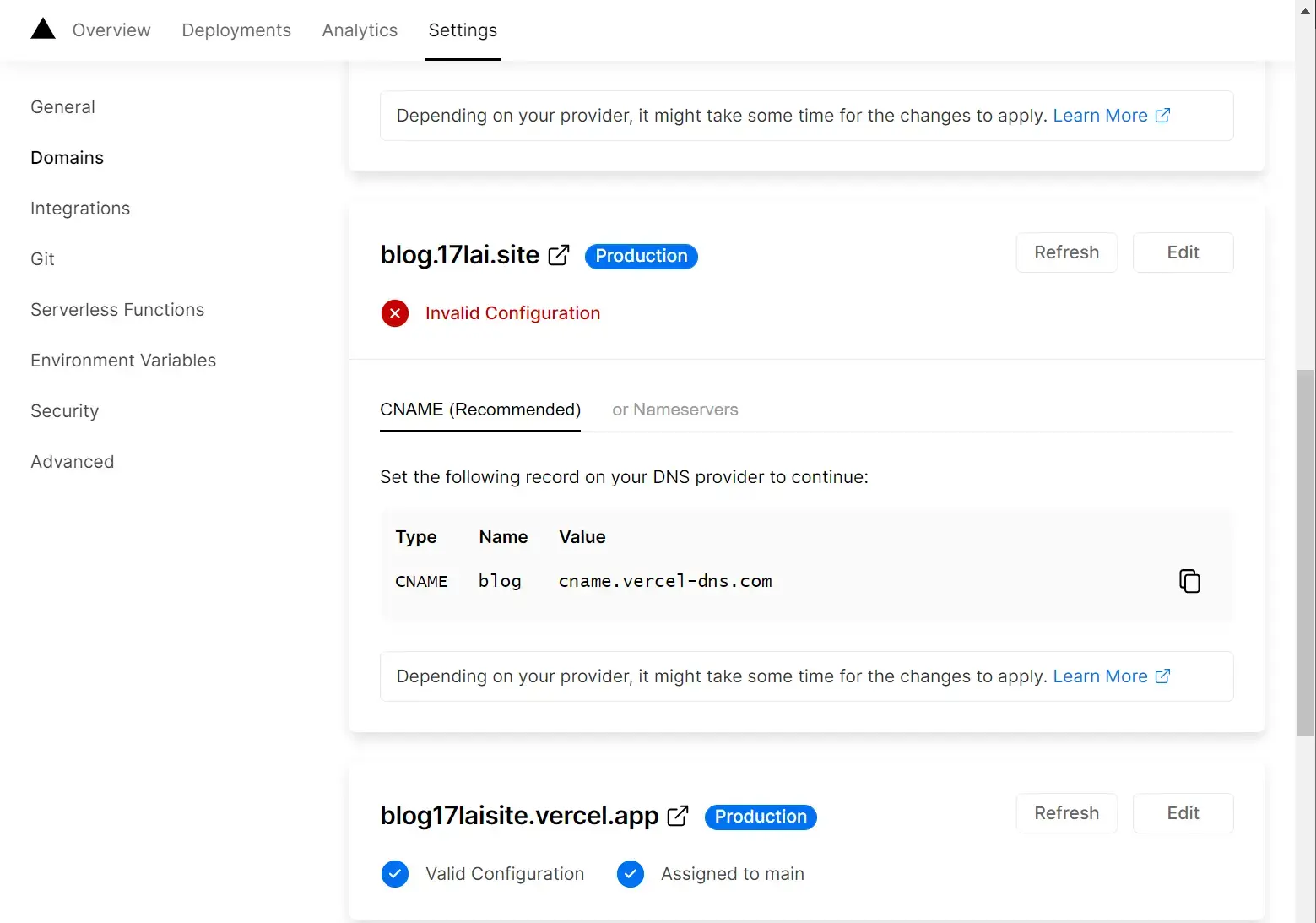
配置多个域名
对其他新增的域名选择重定向到自己的主域名即可
自定义Vercel服务器位置
Vercel线路已经很快了,但是可以通过选择Vercel部署服务器位置,更进一步加快中国大陆,亚洲区域的访问速度!
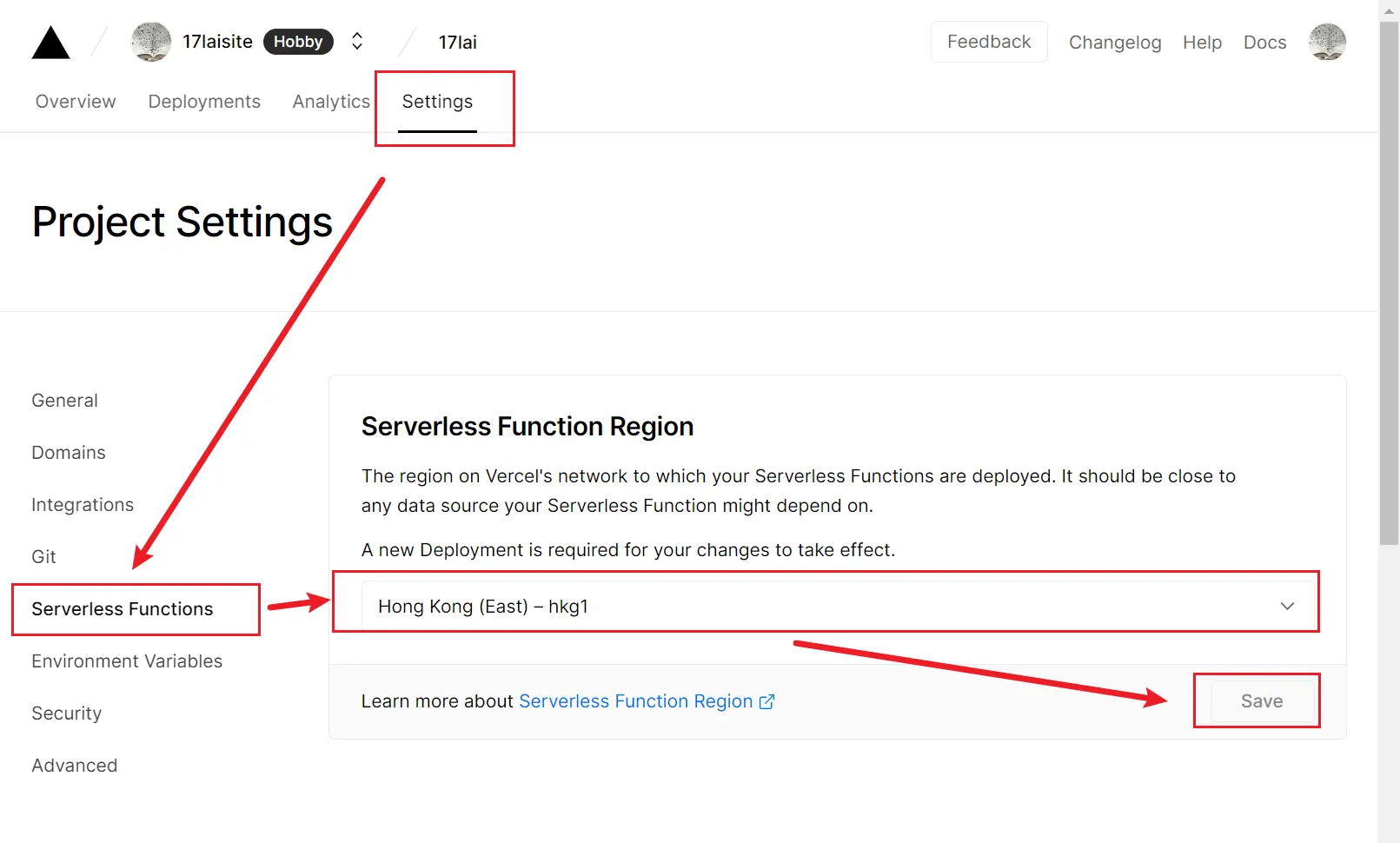
香港服务器虽然没有严格测试,但是中国大陆速度应该是最快的!
自定义Header缓存时间
使用Vercel必备配置,本地缓存加速访问!
vercel.json
{
  "headers": [
    {
      "source": "/sw.js",
      "headers": [
        {
          "key": "Cache-Control",
          "value": "public, max-age=0, must-revalidate"
        }
      ]
    },
    {
      "source": "(.*)",
      "headers": [
        {
          "key": "Cache-Control",
          "value": "public, s-maxage=86400, max-age=86400"
        }
      ]
    }
  ]
}
Vercel自定义404
Vercel流量超标怎么办?
最近查看了一下Vercel流量使用情况,发现RSS订阅流量太大了,占了30GB流量!
免费Vercel账户每月只有100G免费流量,怎么办?
有两种解决方法:
- 使用 DNS 多线路分流,例如DNSPOD 多线路负载均衡
- 使用 Vercel 提供的 redirects 或者 rewrites功能,把rss访问重定向到其它部署方式,例如Cloudflare
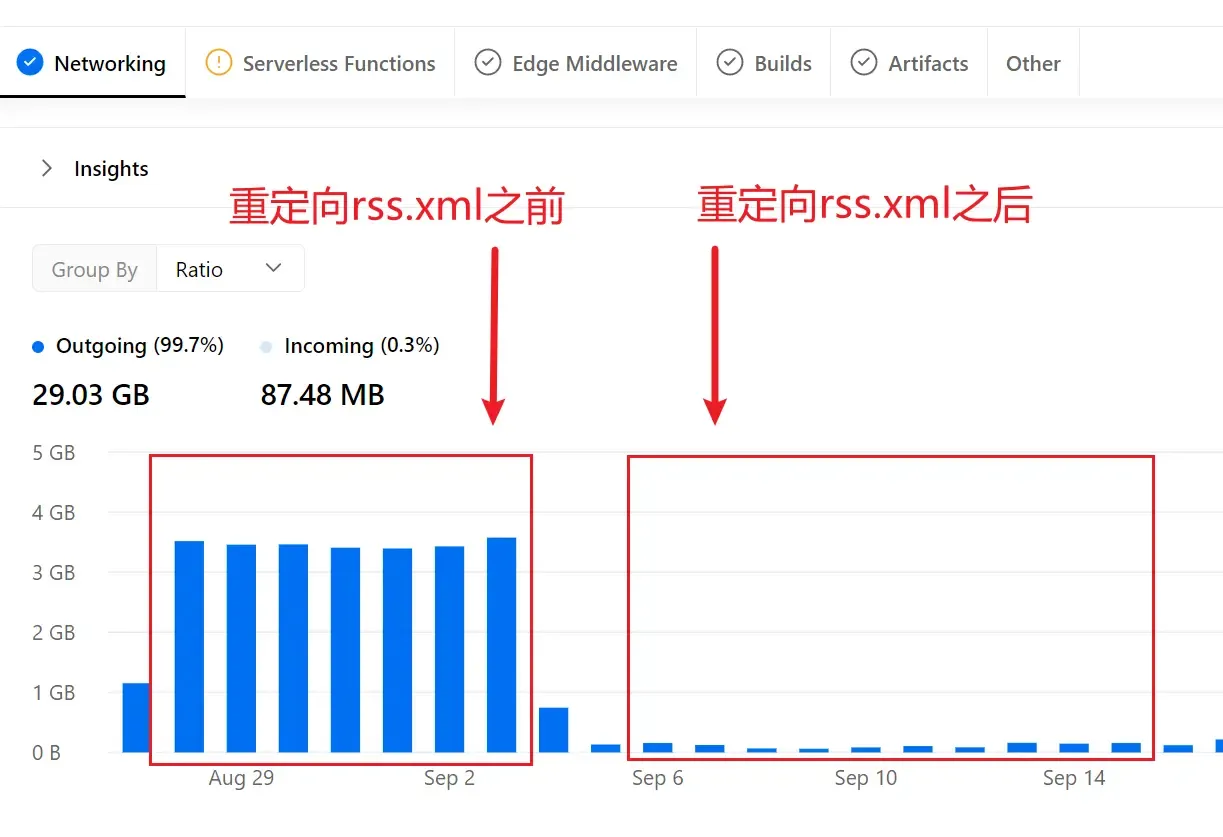
由于个人blog也部署到Cloudflare上面了,https://cfblog.17lai.site,Cloudflare的流量目前看着没限制,如是,可以使用如下重定向方法
"redirects": [
		{ "source": "/atom.xml", "destination": "https://cfblog.17lai.site/atom.xml" },
		{ "source": "/rss.xml", "destination": "https://cfblog.17lai.site/rss.xml" }
  	]
详细 Cloudflare 部署方法,戳 cloudflare Pages 部署
个人使用最终版本如下,各位使用修改对应部分即可。文件路径 [hexo]/source/vercel.json
{
  "headers": [
    {
      "source": "/medias/(.*)",
      "headers": [
        { "key": "Cache-Control", "value": "public, s-maxage=31536000, max-age=31536000, immutable" }
      ]
    },
    {
      "source": "/medias_webp/(.*)",
      "headers": [
        { "key": "Cache-Control", "value": "public, s-maxage=31536000, max-age=31536000, immutable" }
      ]
    },
    {
      "source": "/(.*)\\.woff2",
      "headers": [
        { "key": "Cache-Control", "value": "public, s-maxage=31536000, max-age=31536000, immutable" },
        { "key": "Access-Control-Allow-Origin", "value": "*" }
      ]
    },
    {
      "source": "/(.*)\\.mjs",
      "headers": [
        { "key": "Cache-Control", "value": "public, s-maxage=31536000, max-age=31536000, immutable" }
      ]
    },
    {
      "source": "/(.*)\\.js",
      "headers": [
        { "key": "Cache-Control", "value": "public, s-maxage=31536000, max-age=31536000, immutable" }
      ]
    },
    {
      "source": "/(.*)\\.css",
      "headers": [
        { "key": "Cache-Control", "value": "public, s-maxage=31536000, max-age=31536000, immutable" }
      ]
    },
    {
      "source": "/(.*)\\.webp",
      "headers": [
        { "key": "Cache-Control", "value": "public, s-maxage=31536000, max-age=31536000, immutable" }
      ]
    },
    {
      "source": "/(.*)\\.json",
      "headers": [
        { "key": "Cache-Control", "value": "public, s-maxage=7776000, max-age=7776000" }
      ]
    },
    {
      "source": "/sw.js",
      "headers": [
        { "key": "Cache-Control", "value": "public, max-age=0, must-revalidate" }
      ]
    },
    {
      "source": "/(.*)\\.html",
      "headers": [
        { "key": "Cache-Control", "value": "public, s-maxage=1800, max-age=1800" }
      ]
    }
  ],

  "regions": ["hkg1"]
}
Vercel 账号被禁怎么办?
Your Personal Account was automatically blocked because its usage exceeds the fair use policy
最近某个 vercel app 流量超标了! 程序可能被攻击了,或者程序存在某个bug。发现的时候,账号已经被禁用了。
等了一个月后,账号没有自动解禁!
怎么解封了? 在这里 https://vercel.com/help#issues 点击 【Create a case】,然后邮件联系解封!邮件回复说:
accounts will not auto-unblock after they’ve been blocked for exceeded limits. I can do that manually, but I must first be sure that the underlying issue has been resolved.
技术支持要求解决掉超出限制的原因,然后再回复邮件!应该就可以解禁了。
删除了被攻击或者出bug的 vercel app 之后再次回复邮件,得到回复:
After review, I have unblocked your account. Please note that this is a one-time consideration, and future usage overages may require purchasing a Pro team subscription to unblock your account.
账号终于解禁了,但是再次超出限制就得交钱解禁? 20$每月的价格太高了!
乒乓部署
也可以叫旋转门部署。
解决调试博客插件,修改半成品文章时部署到云端会影响正在查阅博客的用户的问题!
使用Docker版本本地预览是很不错,但是 jsdelivr 版本发布需要在 Github 生成新 release 这时本地就不行了。乒乓部署可以解决这个问题!
具体方法就是同时部署到两个地方A和B,博客域名在两个服务器之间切换。这里以 Vercel 为例
准备工作:
- 创建2个Github仓库,对应服务器A和B的部署
- 建立两个服务器A和B,分别关联两个 Github 仓库
- 把调试完毕的代码上传到两个仓库
- 这时通过服务器A和B都是可以正常浏览的
要调试的时候:
- 发布到A之前,把博客域名转移到服务器B
- 在服务A做一些调试,在线 debug 工作
- 特别是在线 pageseed 测试调优,这种事必备方法。简单不需要新的 jsdelivr 版本调试本地 docker-hexo 调试即可!
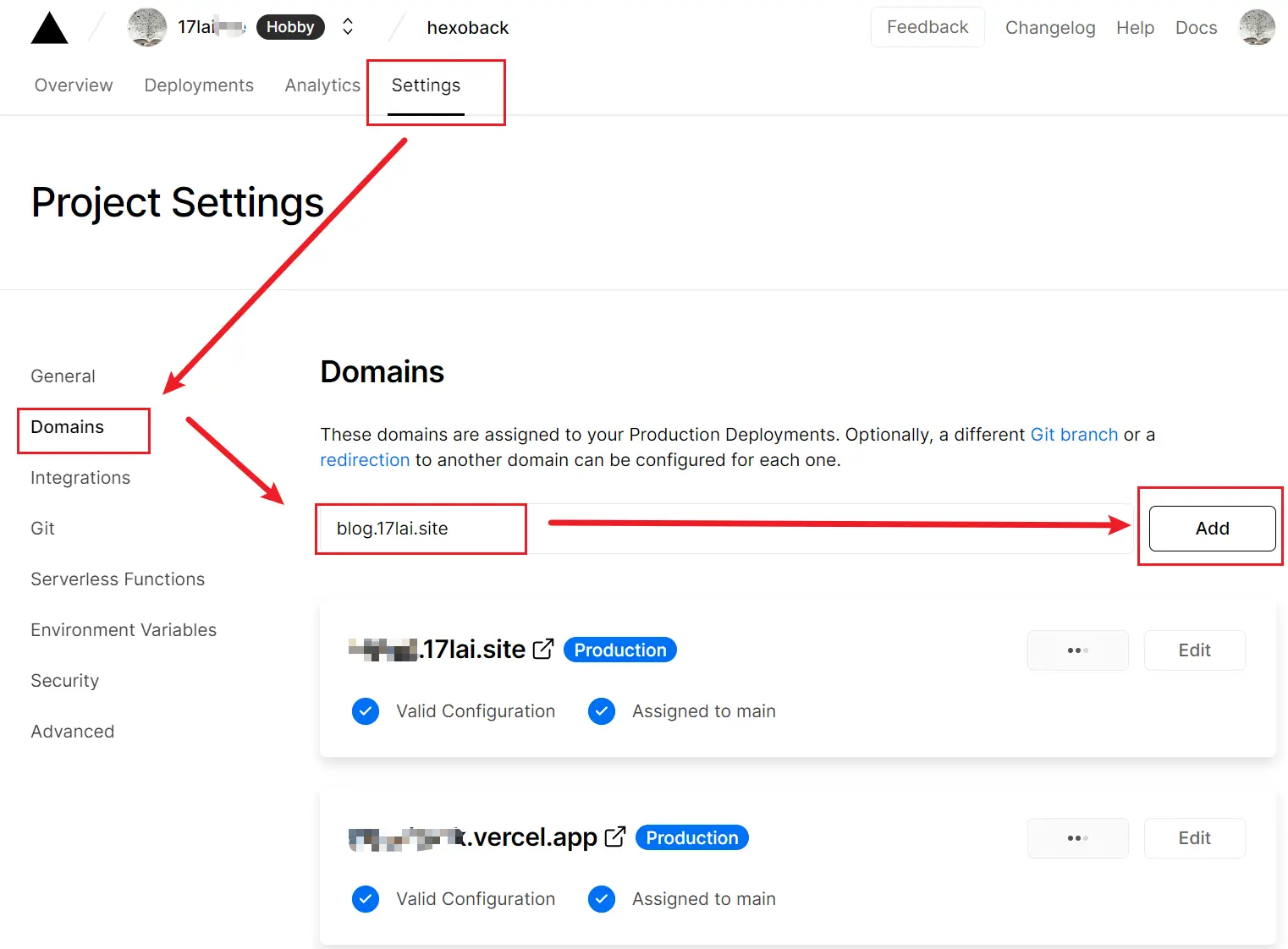
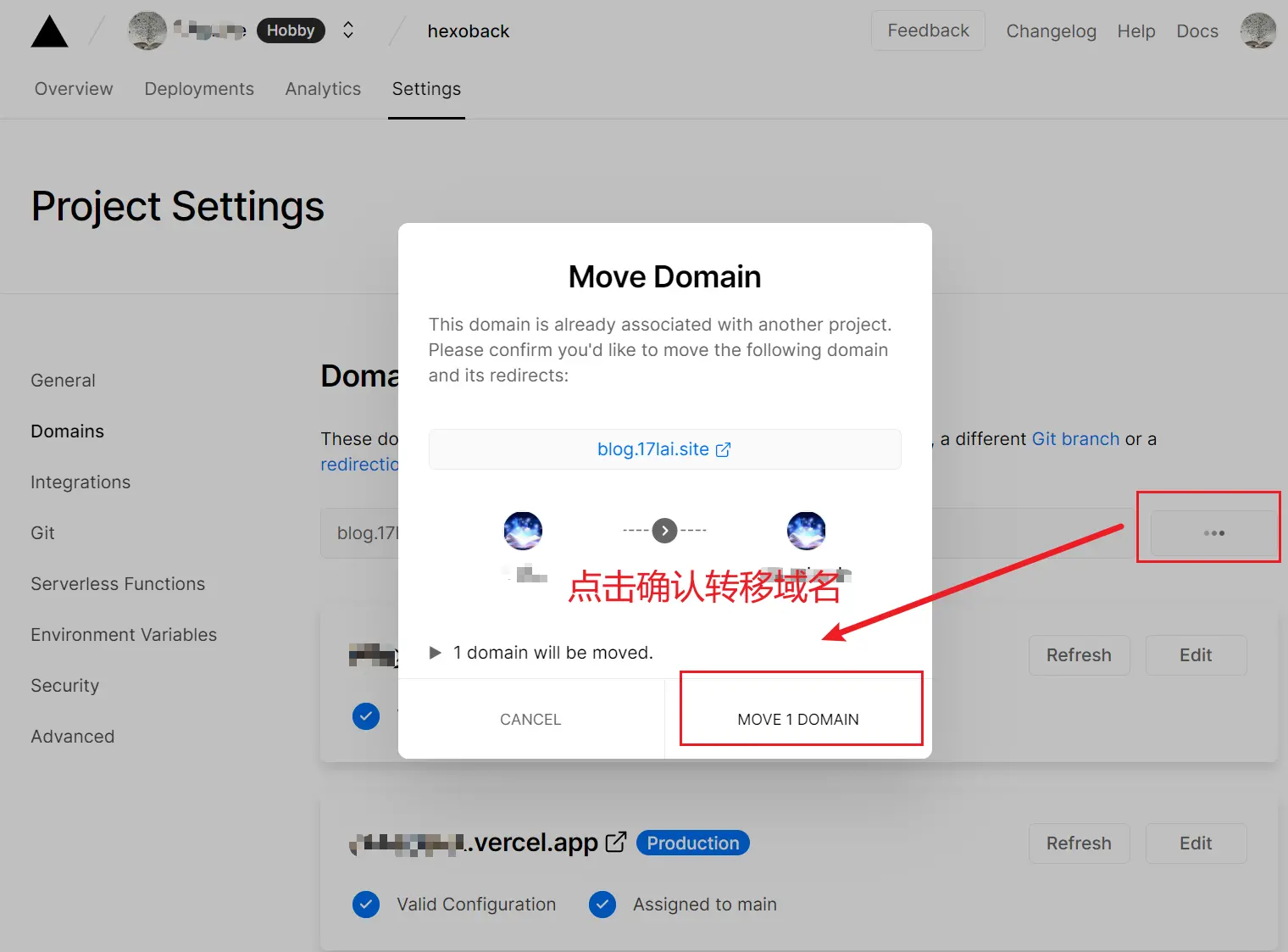
调试完毕后:
- 把域名切换到服务器A
- 同时部署到服务器B,服务器B同步A的部署内容,以便下次备用
总结就是服务器A现行,服务器B做后备,调试发布使用A,调试A的时候B就顶上前台!
这样,调试和正常部署网络服务两不误。是不是感觉自己是个大聪明!
参考&致谢
系列教程
Hexo系列
[十万字图文教程]基于Hexo的matery主题搭建博客并深度优化完全一站式教程
- Hexo Docker环境与Hexo基础配置篇
- hexo博客自定义修改篇
- hexo博客网络优化篇
- hexo博客增强部署篇
- hexo博客个性定制篇
- hexo博客常见问题篇
- hexo博客博文撰写篇之完美笔记大攻略终极完全版
- Hexo Markdown以及各种插件功能测试
- markdown 各种其它语法插件,latex公式支持,mermaid图表,plant uml图表,URL卡片,bilibili卡片,github卡片,豆瓣卡片,插入音乐和视频,插入脑图,插入PDF,嵌入iframe
- 在 Hexo 博客中插入 ECharts 动态图表
- 使用nodeppt给hexo博客嵌入PPT演示
- GithubProfile美化与自动获取RSS文章教程
- Vercel部署高级用法教程
- webhook部署Hexo静态博客指南
- 在宝塔VPS上面采用docker部署waline全流程图解教程
- 自建Umami访问统计服务并统计静态博客UV/PV
笔记系列
- 完美笔记进化论
- hexo博客博文撰写篇之完美笔记大攻略终极完全版
- Joplin入门指南&实践方案
- 替代Evernote免费开源笔记Joplin-网盘同步笔记历史版本Markdown可视化
- Joplin 插件以及其Markdown语法。All in One!
- Joplin 插件使用推荐
- 为知笔记私有化Docker部署
Gitbook使用系列
- GitBook+GitLab撰写发布技术文档-Part1:GitBook篇
- GitBook+GitLab撰写发布技术文档-Part2:GitLab篇
- 自己动手制作电子书的最佳方式(支持PDF、ePub、mobi等格式)